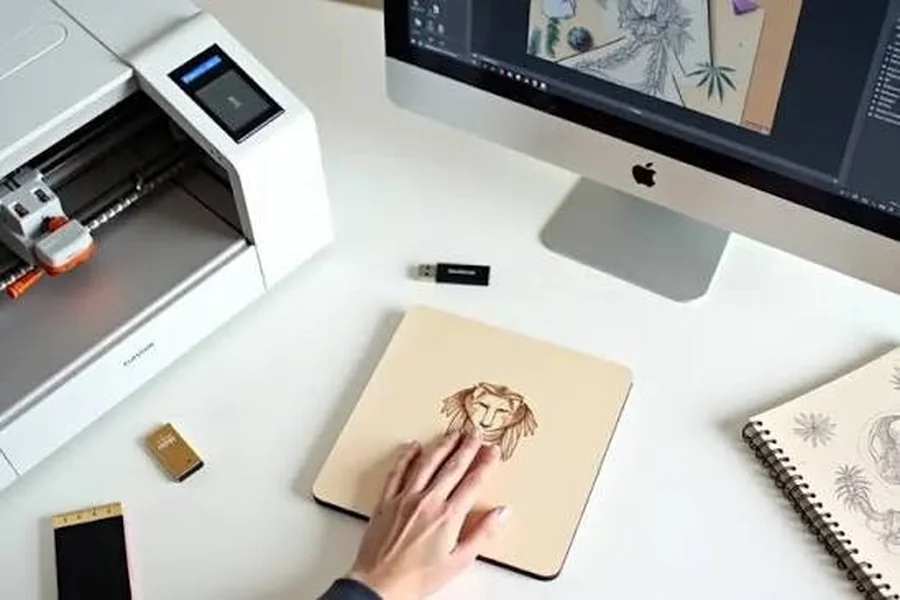
Many creative projects begin with something that cannot be touched. It might be a logo saved on a computer, a name typed into design software, a hand-drawn pattern, or an illustration created for a specific product. The exciting part comes when that digital idea is turned into something physical.
This is where laser engraving becomes especially useful. It gives creators a way to transfer digital artwork onto suitable physical materials, turning simple designs into personalized gifts, decorative objects, business products, and prototypes.
For makers and small businesses, the process can be much more than simply adding a name to a wooden item. It can become a practical workflow that connects digital creativity with real-world production.
From Digital Design to a Physical Product
Every project starts with a design.
A creator might develop artwork from scratch or prepare an existing file using compatible design software. The design can include text, lines, shapes, logos, patterns, or detailed artwork. Before sending it to the machine, the user can adjust its size, position, and other properties according to the product being created.
The next step is choosing the right material. Wood, suitable leather, certain acrylics, coated metals, and other compatible materials can produce very different results. The material should always be checked against the machine manufacturer’s recommendations before processing.
Once the design and material are ready, the laser engraving process can begin.
The basic workflow is straightforward:
Digital design → Prepare the material → Select settings → Position the artwork → Test → Engrave → Inspect and refine
This workflow is important because good results do not come from the machine alone. Material choice, focus, positioning, and settings all play a role in the final appearance.
Understanding the Laser Engraving Process
The laser engraving process uses a focused laser beam to create a visible mark on the surface of a compatible material. Depending on the material and machine, the laser may remove or alter a small portion of the surface to produce text, graphics, or patterns.
Settings such as power, speed, focus, and other machine-specific controls can affect the result. A setting that works well for one material may not produce the same outcome on another.
This is why testing is an important part of the process.
For example, a maker working on a wooden box might first test a small area before engraving the entire lid. If the mark is too light, too dark, or lacks the desired detail, the settings can be adjusted before the final job.
With experience, users become better at understanding how different materials respond. The machine becomes less of a mystery and more of a predictable part of the creative workflow.
Why the Machine Matters
A laser engraving machine serves as the connection between the digital artwork and the physical material. Different machines are designed for different applications, work areas, materials, and levels of production.
Someone making small gifts at home may have very different requirements from a business producing customized products every day.
Precision is one of the major advantages of using a laser system. Fine text, detailed patterns, and carefully positioned graphics can be difficult to reproduce consistently by hand. Digital files also make it easier to repeat a design when several similar products are required.
For example, a small business could prepare one logo file and use it across a collection of suitable products. If the design needs to be changed, the digital artwork can be edited before another item is processed.
When selecting a laser engraving machine, users should consider the materials they intend to work with, project size, available workspace, ventilation requirements, software compatibility, and the type of projects they expect to create.
Creating Better Laser Engraving Designs
The quality of the finished product often starts with the design itself.
Laser engraving designs can be as simple as a person’s name or as detailed as a photograph or decorative illustration. Makers can experiment with fonts, line thickness, patterns, spacing, and image composition to create different visual effects.
A good design should also take the material into account. A highly detailed graphic may look excellent on a screen but may need adjustment before being engraved onto a small physical surface.
For example, a maker creating a wooden keepsake box might choose a clean name design for the front and a more detailed pattern for the lid. The goal is not simply to include as much detail as possible, but to make sure the design works well at the final size.
This balance between digital artwork and physical limitations is an important part of successful laser engraving.
Popular Laser Engraving Projects
There are countless laser engraving projects for beginners, hobbyists, and experienced creators.
Simple projects can include:
- Personalized keychains
- Wooden coasters
- Name plaques
- Bookmarks
- Ornaments
- Gift boxes
- Small signs
- Notebook covers
- Product tags
As makers gain experience, they can move toward larger or more detailed work, including wall décor, business signage, packaging elements, custom artwork, display pieces, and product components.
For a small business, these projects can also become products that customers can personalize. A wedding customer might want names and dates added to decorative items, while a company might need its logo placed on suitable promotional products.
The digital nature of the workflow makes these changes easier to manage than creating every variation from scratch.
The Growing Appeal of Custom Laser Engraving
The popularity of custom laser engraving comes largely from personalization.
People often value products that feel specifically made for them. A simple wooden plaque becomes more meaningful when it carries a family name. A notebook can feel more personal when it includes someone’s initials. A business gift can look more professional when it features a carefully placed company logo.
Customization can also help small businesses differentiate their products.
Instead of producing exactly the same item for every customer, a maker can offer different names, messages, designs, or branding options. The physical product may remain similar, but the personalization gives each order its own identity.
Another advantage is the ability to make changes digitally. A customer request can often be incorporated into the design file before production, making the workflow more flexible for smaller batches and individual orders.
How Modern Machines Make the Workflow Easier
Today’s equipment can include features designed to simplify setup and everyday operation. A smart laser engraver, for example, may offer functions related to positioning, focusing, software control, or other aspects of machine operation.
These features can be helpful for people who are still becoming familiar with laser technology. Instead of spending all their time figuring out basic setup, users can focus more attention on preparing their designs and improving their projects.
However, automation does not remove the need for good judgment. Users still need to select suitable materials, understand basic settings, test their work, and follow safety instructions.
A smart laser engraver can make the workflow more convenient, but the quality of the finished product still depends on thoughtful preparation.
From First Test to Finished Product
One of the most useful aspects of laser engraving projects is that makers can learn through experimentation.
A first attempt may not be perfect. The engraving could be too shallow, the design may need better positioning, or the material may produce a different result than expected.
Instead of treating this as a problem, makers can use the result as feedback.
They can adjust the artwork, change the settings, test another area, and run the project again. Over time, this process builds practical knowledge about materials, design preparation, and machine operation.
That ability to refine an idea is what makes laser engraving more than a simple decoration technique. It becomes part of a creative production process.
Turning Digital Ideas Into Real-World Creations
The journey from a digital concept to a finished object can be surprisingly simple when the workflow is planned properly:
Digital design → laser engraver → suitable material → finished product
A design can be created and adjusted digitally, prepared for the selected material, tested on the machine, and then turned into a physical object that can be used, displayed, gifted, or sold.
Whether you’re creating personalized gifts, home décor, business products, or small-batch items, a smart laser engraver can make it easier to turn digital ideas into physical creations.
For creators looking for a modern solution, the TOOCAA NOVA is designed to fit this type of creative workflow. Its focus on accessible operation and modern laser functionality makes it a relevant option for makers who want to explore digital-to-physical production.
Ultimately, successful custom laser engraving is not only about owning the right equipment. It is about combining a good design with the right material, appropriate settings, careful testing, and a willingness to refine the result.
That is what makes the technology so appealing. A design that begins as pixels on a screen can eventually become a personalized gift, a business product, a decorative piece, or a completely new creation that someone can hold in their hands.