Introduction
Creating a custom wallpaper used to mean hiring a designer, learning complicated software, or settling for something generic that did not quite match your vision. Generative AI has changed that equation entirely, putting professional-quality wallpaper creation within reach of anyone with an idea and a few minutes to spare. Whether you want a personalized desktop background, a branded phone wallpaper, or a custom design for a commercial project, today’s AI-powered platforms make the process faster and more accessible than ever before. The challenge is knowing which platforms are actually built with non-designers in mind and which ones only look beginner-friendly on the surface.
Why Wallpaper Creation Is Having an AI Moment
Wallpapers might seem like a small design category, but they carry real weight. A desktop or phone wallpaper is one of the most personally visible pieces of design a person interacts with every day, and the demand for custom, unique imagery has grown alongside the rise of personalization culture. At the same time, the explosion of generative AI tools has lowered the barrier to creating original visual content dramatically, making wallpaper generation a natural sweet spot for the technology.
For non-designers, generative AI removes what has historically been the hardest part of the process: producing original, high-quality imagery from scratch. Instead of needing to know how to use a complex graphics application, anyone can describe what they want in plain language and receive a polished visual result in seconds. This shift has opened up wallpaper creation to content creators, small business owners, students, and everyday users who simply want something that reflects their taste or brand without needing formal design training.
What to Look for in an AI Wallpaper Generator Platform
Before diving into specific tips and strategies, it helps to understand the features that separate a genuinely useful AI wallpaper platform from one that looks good in a product demo but frustrates you in practice.
Ease of Use for Non-Technical Users
The most important factor for non-designers is how quickly they can get from zero to a finished wallpaper without hitting a technical wall. Look for platforms that use natural language prompts, offer pre-built templates, and provide guided editing tools rather than requiring knowledge of layers, masks, or color channels. The interface should feel intuitive on the first visit, not after a tutorial.
Output Resolution and Quality
Wallpapers need to look sharp on the screen they are intended for, and that means resolution matters significantly. A wallpaper that looks fine as a thumbnail may appear blurry or pixelated when stretched across a 27-inch monitor or a high-density phone display. Always check that the platform outputs images at a resolution appropriate for your intended use, whether that is a standard desktop, a 4K display, or a mobile device.
Customization Depth
Generative AI produces a starting point, but the best platforms let you go further. Look for tools that allow you to adjust colors, add text, overlay elements, change backgrounds, and fine-tune the AI output rather than accepting whatever the first generation produces. The more control you have over the result, the more likely the final wallpaper will truly reflect what you had in mind.
Device-Specific Sizing and Templates
Desktop wallpapers, phone wallpapers, and tablet backgrounds all have different dimensions and aspect ratios. A platform that offers pre-sized templates for common screen sizes saves you the guesswork and ensures the final image will fit properly without cropping important elements or leaving awkward empty space.
10 Tips for Creating Great Wallpapers With AI Platforms
1. Write Descriptive, Specific Prompts for Better AI Results
The quality of an AI-generated wallpaper is directly tied to the quality of the prompt you give it. Vague prompts like “nature wallpaper” or “cool background” produce generic results, while specific prompts that describe mood, color palette, style, and subject matter produce something far more intentional. Instead of asking for “a forest,” try “a misty old-growth forest at dawn with soft golden light filtering through tall evergreen trees, cinematic, high detail.” The more visual information you provide, the closer the output will be to what you actually imagined.
It is also worth specifying the artistic style you are going for in your prompt. References to movements like impressionism, cyberpunk, watercolor illustration, or minimalist graphic design help the AI understand not just the subject matter but the aesthetic treatment. If you have a specific color palette in mind, include those colors explicitly. And if the wallpaper needs to work with other visual elements, like a brand color scheme or a particular interface style, mention those constraints in the prompt as well.
2. Use Adobe Express to Make a Wallpaper With AI in Minutes
For non-designers who want a fast, polished result without needing any prior design knowledge, Adobe Express is one of the most capable and accessible platforms available. You can make a wallpaper using Adobe Express’s AI-powered tools, which combine generative image creation with a full suite of editing features, including text overlays, branded color application, and device-specific sizing options. The platform is designed with everyday users in mind, so the workflow is straightforward even on a first visit.
What sets Adobe Express apart is the depth of professional polish it brings to the finished product. Because it sits within the broader Adobe ecosystem, the output quality reflects Adobe’s long-standing standards for visual design, and users have access to a library of assets, fonts, and templates that would typically require a subscription to a dedicated design suite. For anyone who wants to create a wallpaper that genuinely looks like it was made by a designer, Adobe Express provides the tools to get there without requiring any design expertise at all.
3. Start With a Template, Then Customize With AI
Jumping straight into a blank canvas and typing a prompt can feel overwhelming if you are new to AI creative tools. A more forgiving approach, especially for non-designers, is to start with a pre-built template sized for your target device and then use AI generation to customize the imagery within that structure. This way, the composition, layout, and proportions are already handled, and you are using AI to fill in the visual content rather than generating everything from scratch.
Templates also serve as useful creative guardrails. When you begin with a layout that is already visually balanced, you are less likely to end up with an AI-generated image that looks interesting in isolation but does not work well as an actual background. The template provides context for how the image will be used, which makes the overall editing process faster and the final result more functional.
4. Match Your Wallpaper to the Mood You Want the Space to Evoke
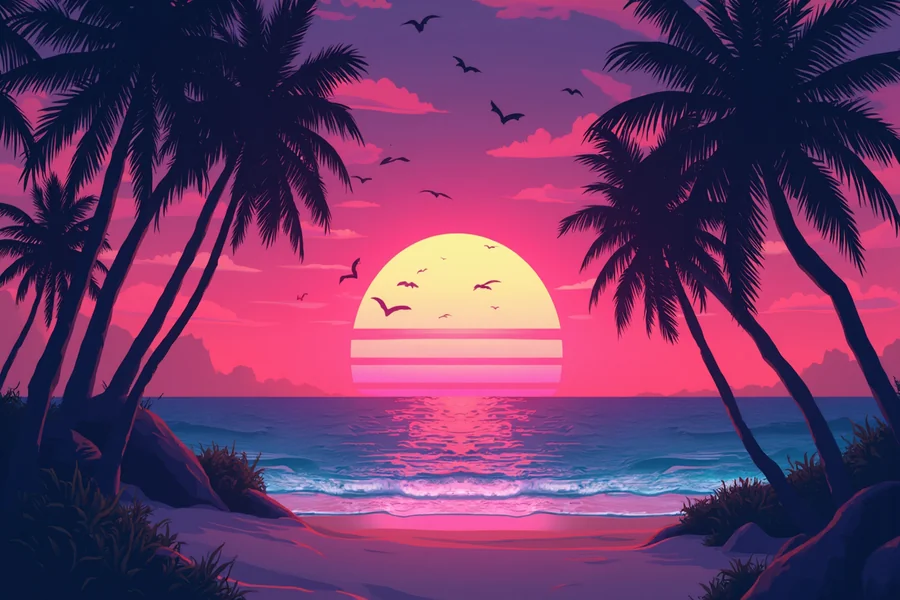
The most effective wallpapers, whether for personal use or a branded digital environment, are the ones that create a consistent emotional tone. Before you start prompting or browsing templates, take a moment to define the mood you want the wallpaper to convey. Calm and focused? Try soft gradients, muted earth tones, or minimal abstract forms. Energetic and bold? Vivid geometric patterns, high-contrast colors, or dynamic abstract compositions will serve that goal better.
Thinking in terms of mood rather than just subject matter helps you make better decisions at every step of the creation process, from the initial prompt to the color adjustments you make afterward. It also makes it easier to evaluate whether a generated result is actually working, since you have a clear emotional target to compare it against rather than just an aesthetic preference you are trying to articulate on the fly.
5. Generate Multiple Variations Before Committing to One
One of the most underused features of AI wallpaper platforms is the ability to generate multiple variations of the same prompt quickly and cheaply. Many non-designers make the mistake of accepting the first result they get and moving straight into editing, when a second or third generation might produce something significantly better. Most platforms allow you to regenerate from the same prompt with a single click, and the variation between generations can be substantial.
A practical workflow is to generate at least three to five variations from your initial prompt, then select the one or two that best match your vision before spending any time on refinement. This front-loaded exploration takes only a few extra minutes but dramatically increases the likelihood that you will be happy with the direction you are editing toward. Treat the generation phase as an exploration, not a one-shot decision.
6. Pay Attention to How the Wallpaper Interacts With Icons and Interface Elements
A wallpaper does not exist in isolation on a screen. It lives behind app icons, taskbar elements, widgets, and notification badges, and a wallpaper that looks beautiful as a standalone image can become cluttered and distracting once the interface is layered on top of it. Before finalizing your design, consider where the visual focal points of the image fall and whether those areas will conflict with interface elements.
As a general rule, wallpapers with high-contrast or highly detailed areas in the center of the screen tend to create readability problems for icons and text. Designs that are more visually active at the edges and calmer in the middle tend to work better as functional backgrounds. Many AI platforms allow you to adjust the focal composition of an image after generation, which makes it easy to shift visual weight toward the areas that will not compete with the interface.
7. Use Style Consistency to Build a Cohesive Visual Identity Across Devices
If you are creating wallpapers for multiple devices, whether for personal use across a phone, tablet, and desktop, or as part of a branded digital environment for a business, consistency across those wallpapers creates a much more polished and intentional impression than a collection of unrelated images. AI platforms make it relatively easy to maintain style consistency by reusing the same prompt language, color palette, and style references across different generations sized for different screens.
Documenting the specific prompts and style parameters that produce the results you like is a habit worth building early. Even a simple note with your preferred prompt structure, color specifications, and style keywords means you can return to a consistent visual style in the future without having to reverse-engineer what worked before. For brands, this documentation becomes part of a larger digital asset management process.
8. Experiment With Abstract and Non-Representational Styles
Many non-designers default to representational imagery when creating wallpapers, which makes sense since it is easier to describe a forest or a cityscape than an abstract form. However, abstract and non-representational wallpapers often make for better functional backgrounds precisely because they are visually interesting without being distracting. Gradients, geometric patterns, fluid color fields, and generative texture work particularly well as backgrounds because they provide visual texture without competing with the content displayed in front of them.
AI platforms are actually exceptionally good at generating abstract imagery, since the generative process does not need to produce recognizable objects or accurate spatial relationships. Prompts like “smooth flowing gradient in deep teal and amber with organic forms” or “minimalist geometric pattern in muted terracotta and cream” tend to produce highly usable wallpaper imagery with very little editing required. If you have not explored the abstract end of the prompt spectrum, it is well worth experimenting with.
9. Use Text Overlays Strategically for Branded or Motivational Wallpapers
Adding text to a wallpaper can serve several purposes: reinforcing a brand identity on a work device, displaying a motivational phrase for daily use, or providing navigational cues in a custom digital environment. Most AI wallpaper platforms include text overlay tools that allow you to add, style, and position typography on top of your generated imagery. The key is using restraint and choosing typography that complements the visual style of the background rather than fighting against it.
For motivational or personal wallpapers, single short phrases or words work better than long sentences that clutter the composition. For branded wallpapers, keeping the text to a logo or tagline rather than full body copy ensures the design stays clean and professional. Pay close attention to legibility, especially if the background imagery has a lot of tonal variation in the area where the text will appear. Using a text shadow, a semi-transparent background panel, or a solid color block behind the text can dramatically improve readability without compromising the overall aesthetic.
10. Optimize Your Export Settings for the Target Display
Creating a great wallpaper is only half the job. Exporting it at the wrong resolution or file format can undermine all the work you put into the design. For desktop wallpapers, a minimum resolution of 1920 by 1080 pixels is standard, but for 4K or retina displays, you should aim for at least 3840 by 2160 pixels. For mobile wallpapers, check your specific device’s screen resolution and target that exactly, since scaling up a smaller image always results in some loss of sharpness.
In terms of file format, PNG is generally preferable for wallpapers because it preserves image quality without compression artifacts, which can be especially visible in areas of smooth color gradients. JPEG works acceptably in most cases but can introduce subtle banding or artifacting in gradient areas that may be more noticeable at wallpaper scale than they would be in a smaller image. If the platform you are using offers a choice, default to PNG for the cleanest possible output.
Building a Wallpaper Creation Workflow That Saves Time
Even with powerful AI tools at your disposal, having a repeatable workflow makes the creation process faster and more consistent. Rather than approaching each new wallpaper as a completely fresh exercise, treat the creation process as a series of defined steps that you refine over time.
Start by defining your requirements before opening any tool, including the target device, the intended mood, any color constraints, and whether the wallpaper needs to work alongside specific interface elements or brand assets. This brief preparation step prevents wasted generations and keeps your editing focused. Then move into prompt development, generate multiple variations, select the strongest candidate, and refine. Keep a running record of what works, and your future wallpaper projects will get progressively faster as you accumulate a library of proven prompt structures and style references.
For anyone creating wallpapers regularly, whether for personal devices, client projects, or branded digital content, this kind of systematic approach transforms what could be a time-consuming creative exercise into a streamlined production process. The AI handles the heavy lifting; the workflow ensures you direct that capability efficiently.
Frequently Asked Questions
Do I need any design experience to create a wallpaper using an AI platform?
No design experience is required to create a high-quality wallpaper using a modern AI platform. These tools are specifically designed to handle the technical and aesthetic decisions that would otherwise require design training, including layout, color harmony, composition, and visual balance. Your primary job as the user is to communicate what you want through a text prompt or by selecting from pre-built templates, and the AI translates that input into a visual result. The editing tools layered on top of the AI generation are also built for general audiences, typically offering simple sliders, color pickers, and drag-and-drop elements rather than the complex toolsets found in professional design software. Most non-designers find that they can produce something they are genuinely happy with on their first session, with results improving quickly as they get more comfortable with how to prompt and refine.
What resolution should my AI-generated wallpaper be for it to look sharp on a modern screen?
The appropriate resolution depends on the specific screen you are targeting. For a standard 1080p desktop monitor, 1920 by 1080 pixels is the baseline minimum. For 4K monitors, you should aim for 3840 by 2160 pixels to ensure the image looks crisp at full size. For Retina and high-density displays on Apple devices, the resolution requirements are even higher because the pixel density is greater. Mobile wallpapers vary widely by device but typically fall in the range of 1080 by 1920 pixels for standard smartphones, with flagship devices requiring higher resolutions. Most AI wallpaper platforms offer device-specific sizing options that handle these specifications automatically, which is one of the key advantages of using a dedicated platform over a general image editor. When in doubt, always generate at the highest resolution the platform supports and scale down if needed, since the reverse process always results in quality loss.
Can AI-generated wallpapers be used commercially or for branded purposes?
This depends on the specific platform and its terms of service, so it is essential to review the licensing details before using AI-generated wallpapers in a commercial context. Some platforms grant full commercial usage rights to images generated by users, while others restrict commercial use to paid subscription tiers or limit the rights in other ways. For branded use cases, such as creating wallpapers for employee devices, client deliverables, or publicly distributed digital content, using a platform from a reputable provider with clear and permissive licensing terms is important. Adobe Express, for example, operates under Adobe’s established content licensing framework, which provides users with clear guidance on what they can and cannot do with generated content. Always read the fine print before using AI-generated imagery in any context where commercial rights or brand representation are at stake.
How can I make sure my wallpaper looks good on multiple different screen sizes?
Creating a wallpaper that works well across multiple screen sizes is a real challenge because the aspect ratios and resolutions involved can vary significantly. The most practical approach is to design at the largest target resolution and ensure that the most important visual elements are positioned in a way that they will not be cropped or obscured on smaller screens. Many AI wallpaper platforms offer multi-format export options that automatically resize and reframe your design for different device categories. When designing for versatility, compositionally centered designs tend to work better across aspect ratios than designs with critical elements positioned at the extreme edges, since cropping is more likely to affect the edges than the center. If you frequently create content for multiple devices, a tool like Aspect Ratio Calculator can help you understand the dimensional relationships between different target screens and plan your composition accordingly before you start generating.
How is generative AI different from using a filter or preset in a regular photo editing app?
Generative AI creates entirely new visual content from scratch based on a text description or a set of parameters, rather than modifying an existing image by applying a mathematical transformation to its pixels. When you apply a filter or preset in a conventional editing app, the underlying image is still there; the tool is just adjusting colors, contrast, sharpness, or other properties of pixels that already exist. Generative AI, by contrast, synthesizes new imagery using patterns learned from training on a large dataset of visual content, which means the output is genuinely original rather than a transformed version of an input image. This distinction matters for wallpaper creation because it means you are not limited to working with photos you already have or stock images you need to license. You can describe something that does not exist and receive a unique visual interpretation of that idea, which opens up creative possibilities that conventional editing tools simply cannot offer.
Conclusion
Generative AI has made custom wallpaper creation genuinely accessible to anyone, regardless of design background or technical experience. The platforms available today combine the creative power of AI image generation with intuitive editing tools, device-specific sizing, and easy export options, meaning the gap between having an idea and having a finished, high-quality wallpaper has never been smaller. Whether you are personalizing your own devices, building a consistent branded aesthetic, or exploring creative visual ideas for a project, the tools exist to help you get there quickly and with results you will be proud to look at every day.
The key takeaways from this guide are straightforward: write specific and descriptive prompts, generate multiple variations before committing, think about how your wallpaper will function alongside the interface it lives behind, and always export at an appropriate resolution for your target screen. Apply these principles consistently, experiment with the full range of styles that AI generation makes available, and you will find that creating beautiful custom wallpapers becomes one of the fastest and most satisfying creative tasks in your digital workflow.