From effortless image creation to immersive 3D scene building, Krea AI stands out as a dynamic creative playground designed for artists, designers, and content creators. In this 1,000+ word deep dive, we explore everything that makes Krea AI a standout tool—from real-time generation and video enhancement to community support and professional workflows.
1. What Is Krea AI?
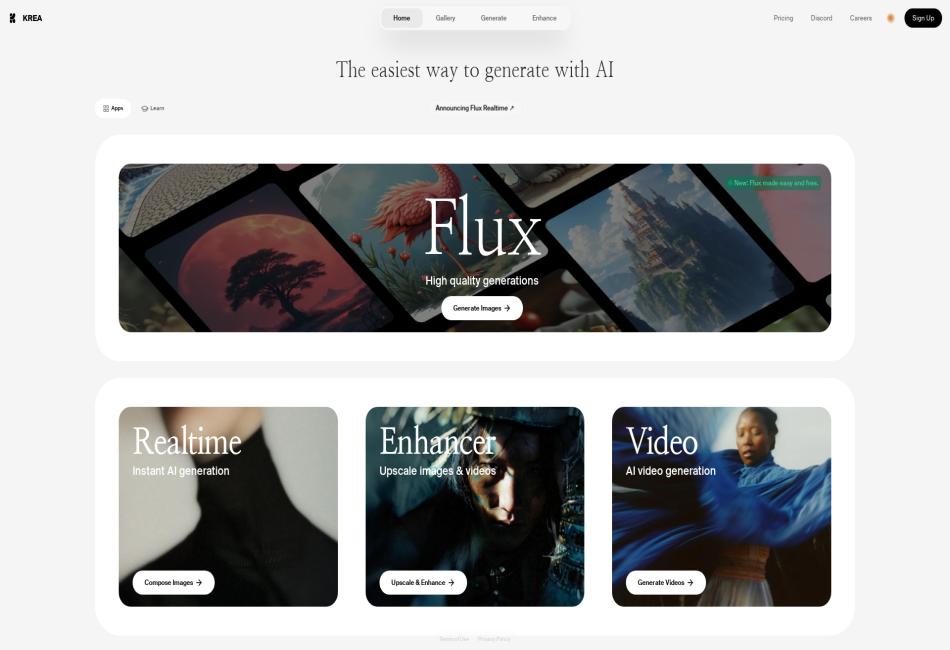
Krea AI is a web-based, real‑time generative AI platform that allows users to create, edit, and enhance images, videos, and 3D assets through text prompts, doodles, and intuitive controls .
Core capabilities include:
Real‑time image generation responding instantly to prompts and on-canvas interactions.
Video generation & editing with features like lip-sync and restyling.
Upscaling and enhancement, pushing outputs up to 22K resolution.
3D object creation and scene editing using AI-generated meshes.
AI chat interface to guide and refine creative decisions.
2. Real-Time Image Generation: The Heart of Krea
Unlike traditional AI tools that require waiting, Krea updates visuals instantly:
As you type or draw, the canvas regenerates live — no rendering queue, just creative flow .
Draw simple shapes (e.g. circle for sun) directly on the canvas, and Krea interprets and seamlessly incorporates them.
The interface features split-screen editing: text prompts on one side, evolving visuals on the other .
This interactive loop makes ideation feel like brainstorming with a digital collaborator—instantly responsive and highly experimental.
3. Image Editing, Upscaling & Enhancement
Beyond generation, Krea includes powerful refinement tools:
Quick Enhance and Upscale: transform outputs or uploads, boosting clarity up to 8× or even 22K resolution .
Control settings like AI strength, resemblance, and clarity—achieving a balance between style fidelity and aesthetic quality .
Offers mini-apps like Logo Illusions and AI Patterns, ideal for designers creating brand visuals or pattern-based assets .
4. Video Generation: Lip-Sync & Restyle
Krea’s video capabilities expand creative possibilities:
Lip-sync tool: animate existing video with new audio—dub voices, translate speech, or create content.
Video restyling: apply artistic filters and new styles to existing footage .
AnimateDiff and support for keyframe-based effects allow users to generate short videos directly via prompts .
Beta tools let creators import imagery, set animation styles, and manipulate video output effortlessly.
5. 3D Object Generation & Scene Editing
Krea doesn’t stop at 2D:
Generate 3D meshes from text or images—a breakthrough for rapid prototyping in game design or AR/VR .
Use the Stage editor to position, rotate, and customize lighting—turning flat art into dynamic 3D scenes .
This bridges the gap between AI-assisted imagery and interactive 3D creativity.
6. Community & Custom AI Models
Krea empowers users to train personal AI models:
Upload art style samples to teach Krea your aesthetic voice.
Users report success training and using custom LoRAs via Discord support channels .
The active Discord community is a hub for sharing work, prompts, and tips .
7. Performance & Speed
Krea’s real-time responsiveness isn’t just UI magic—it’s rooted in efficient tech:
Uses Flux-based models and avoids third-party API layers, reducing latency .
Users praise its blazing speed and ability to adjust on-the-fly without delays .
This low friction keeps creativity flowing.
8. Pricing Plans
Krea offers tiered subscriptions:
| Plan | Price | Features |
|---|---|---|
| Free | $0/month | Real-time generation, daily limited usage, no upscaling or video tools |
| Basic | $10/month | All image/video features, moderate usage limits |
| Pro | $35/month | Increased quotas ($180k images, 1000 videos), private mode |
| Max | $60/month | Maximum usage, early feature access, team support |
Free tier is generous for freelancers, while paid tiers suit professionals and teams.
9. Pros & Cons
Pros
Real-time responsiveness enables intuitive, iterative creativity .
Versatile media tools: images, video, 3D, custom model training.
Affordable tiers with professional features.
Engaged user community with active sharing and support.
Cons
Occasional anatomical inaccuracies, especially with humans .
Some advanced controls and video tools are still in beta.
Data security concerns: users report limited transparency on uploads and IP usage .
Support responsiveness varies, especially via Discord.
10. Alternatives & Comparisons
Competitors include Getimg, Clipdrop, Meta AI, Midjourney, and Stable Diffusion:
Getimg: real-time functionality but lacks shape/doodle interactivity .
Clipdrop: robust editing suite, higher cost, no real-time canvas .
Midjourney/Stability: focused on image quality; no real-time edits or video tools.
Meta AI: conversational generation but rigid compared to Krea’s canvas interactivity .
Krea stands out for its interactivity, speed, and multi-media support.
11. Ideal Use Cases
Krea AI is ideal for:
Concept artists drafting visuals with real-time feedback.
Social media creators producing short videos and animated snippets.
Product designers prototyping 3D assets and packaging visuals.
Marketers and agencies using logo illusions and pattern generation.
Educators and teams using collaborative style training and shared workspaces.
12. Looking Ahead
Krea is rapidly expanding its toolkit:
Upcoming camera controls, deeper 3D scene editing, and API integration.
Likely focus on data governance and content security as user base grows.
Continued pace of innovation fueled by active user feedback and community contributions.
13. Final Verdict
Krea AI is a bold and creative-forward platform—shaking up expectations with live editing, multi-format generation, and collaborative tools. It isn’t perfect—fine detail and security require work—but it already delivers an inspiring, lightning-fast creative experience at an accessible price.
If you’re seeking real-time, iterative generation across images, video, and 3D, Krea is worth exploring. Start with the free plan, join the Discord, and see how it transforms your creative flow.
FAQ: Krea AI – Real‑Time Creative AI Tools
Q1: What is Krea AI?
Krea AI is a web-based generative AI platform offering real-time tools for creating and editing images, videos, and 3D assets using text prompts and interactive canvases.
Q2: How does Krea create images in real time?
As you type or sketch on the canvas, Krea instantly updates visuals live—no waiting in queues, making creation dynamic and immediate.
Q3: Can I generate videos and 3D scenes too?
Yes! Krea features video tools like lip-sync and style transforms, plus 3D mesh generation and scene editing for versatile creative outputs.
Q4: Do I need design skills to use it?
Not at all. With intuitive controls—sketches, prompts, quick-upscale options—anyone, from beginners to pros, can jump right in.
Q5: What’s the pricing like?
Krea offers:
Free tier: basic access with usage limits
Basic ($10/mo), Pro ($35/mo), Max ($60/mo) tiers: more features, higher quotas, early access, and private mode.
Q6: Is there a community or support?
Yes, an active Discord community exists where users share custom models, examples, prompts, and feedback.
Q7: What are the standout benefits?
– Real-time response
– Integrated image/video/3D on one platform
– Custom model training
– Speed and ease-of-use
Q8: Any limitations to know?
Some tools are still in beta, occasional artifacts in generated images, and users may want clearer data privacy policies.